User Guide (RDP)
This guide is for users utilising an RDP (remote desktop protocol) connection method. If you're meant to be using Parsec to connect to your vdesk please refer to the Parsec guide instead.
You do not need to use the Inevidesk client application to connect to your vdesk via RDP. You can, however, use it to remote power control your vdesk or check its running status. Inevidesk credentials (email and password) will be required to use the application. These should be provided by your Inevidesk administrator.
Power control
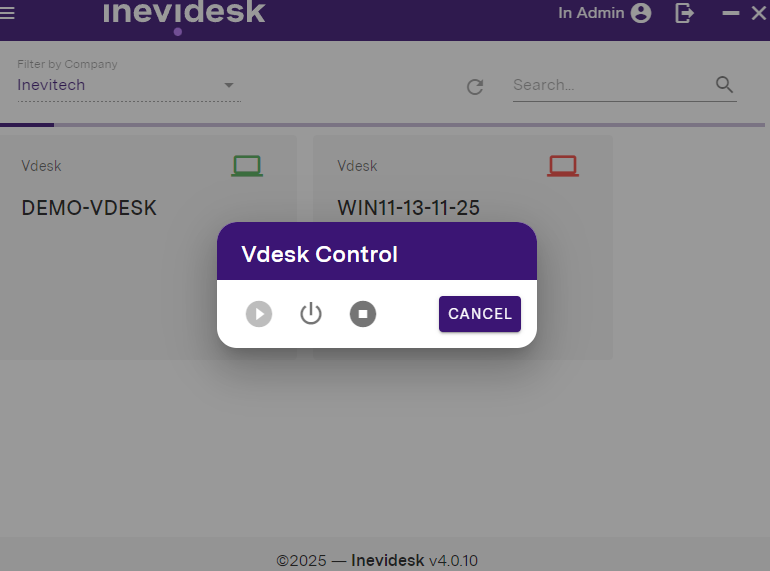
The computer icon in the top right of each tile indicates whether the vdesk is running (green) or not (red), If the icon is amber then the vdesk is in the process of rebooting or shutting down.
Clicking on the icon will allow you to remote power control the vdesk. You have the options to ‘Start’, ‘Shutdown’ or hard ‘Stop’. This can be used to power off a vdesk when not in use or to stop / reboot in case of a freeze.
Pooled vdesks
You can also use the Inevidesk application to see which pooled vdesks are available for use.
A pooled vdesk is a type of vdesk that can be accessed by any user or restricted to certain users from an assigned group. They are designed for short term use only. Be sure to review proper use with your Inevidesk administrator.
Please use the RDP credentials provided by your administrator to connect to a pooled vdesk. Connecting to it will automatically remote it from the list of available machines for other users in the pool.